One ancestry report, two ways to start

Discover the populations your DNA is closest to.

Start with raw DNA data, or enter known family origins if you have not tested yet. World Genetics builds a visual report with closest matches, breakdown models, and a heatmap.

PopulationDistance
๐Ÿ‡บ๐Ÿ‡ธ Anglo-AmericanVery close
๐Ÿ‡ซ๐Ÿ‡ท FrenchClose
๐Ÿ‡ฉ๐Ÿ‡ช GermanClose
๐Ÿ‡ฎ๐Ÿ‡น Italian VenetoSomewhat close
๐Ÿ‡ฒ๐Ÿ‡ฝ Mexican MestizoDistant
Anatolian Neolithic Farmer44.5%
Western Steppe Herder41.6%
Western Hunter-Gatherer13.9%
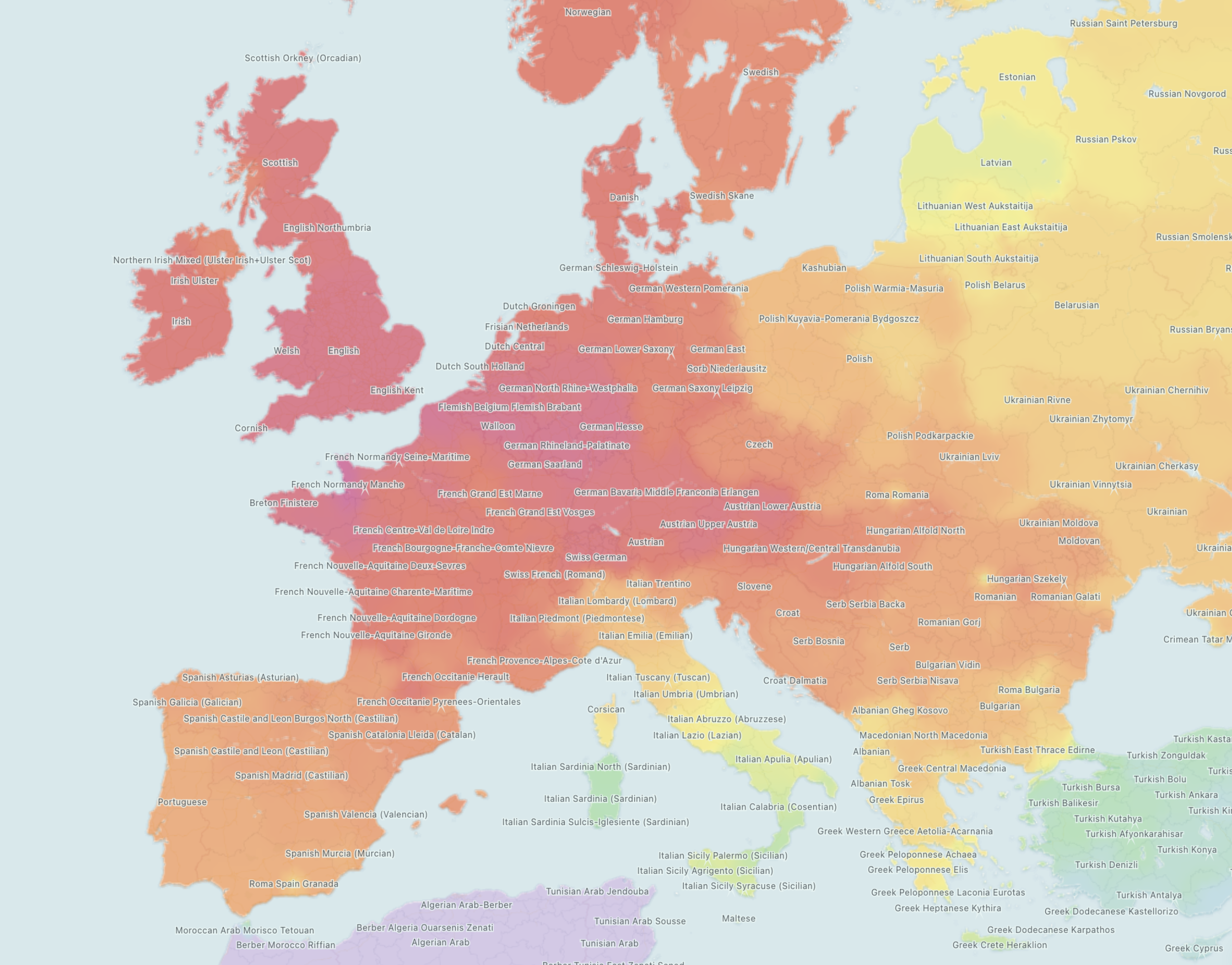
World Genetics heatmap preview
Compatible with raw data from
๐ŸŽฏ

Closest matches

Compare your result against modern population averages and ancient samples. The report ranks the closest references first and uses easy distance labels so you can scan what is very close, close, or more distant without staring at raw numbers.

๐Ÿงฌ

Ancestral breakdown

Breakdown models translate your coordinates into readable ancestry components. You can see how broad ancient signals and regional references combine, with percentages, colored bars, and pie charts built for quick comparison.

๐Ÿ—บ๏ธ

Interactive heatmap

The heatmap shows where your similarity clusters geographically. Warmer areas point toward closer reference populations, while labels help you understand which sample groups are driving the map.

How DNA upload works

Use the raw DNA file you already have.

Download your raw DNA file from your testing company, then upload it on the DNA report page. World Genetics accepts common raw-data exports from major providers.

Download your raw data file
  1. Open your account settings.
  2. Find the raw data download area.
  3. Confirm the download request if prompted.
  4. Save the original ZIP or text file and upload it on the report page.
Download your DNA data export
  1. Go to DNA settings.
  2. Choose the option to download DNA data.
  3. Complete the email or security confirmation.
  4. Keep the downloaded ZIP file unchanged and upload it on the report page.
Export the kit data
  1. Open the DNA kit management area.
  2. Select the kit you want to use.
  3. Choose the download option and confirm ownership.
  4. Upload the raw data file you receive without editing it.
Download from results tools
  1. Open the results and tools area.
  2. Choose the raw data download.
  3. Save the autosomal raw data file.
  4. Upload the original export without editing it.
ANCESTRY ESTIMATE

No DNA test? No problem.

If you know where your parents, grandparents, or great-grandparents come from, World Genetics can create a population-based estimate. Raw DNA is strongest, but family origins are enough to explore a meaningful first report.

Closest match Loading database...
Distance Close
Huge reference database

Built for detailed population comparison.

World Genetics compares against a broad modern and ancient reference set, including regional groups, diaspora profiles, and historical samples.

ModernRegional population averages
AncientHistorical sample comparisons
GlobalEurope, Asia, Africa, the Americas, Oceania
Breakdown models

See the components behind the result.

Breakdown models turn coordinates into readable components, so you can see how ancient and regional signals combine instead of only seeing a list of matches. They are useful for comparing different models, checking whether a component is stable, and understanding the broad ingredients behind your closest populations.

Fit 4.660 (Good)
Your data is secure

Designed to protect your raw DNA file.

World Genetics keeps the sensitive part local: your raw DNA file is processed in your browser, and your account is used to save generated coordinates so you can return later.

Raw DNA stays local

Your raw DNA file is read in your browser to generate coordinates. It does not need to be stored by World Genetics.

Only coordinates are saved

Your account can save generated G25-style coordinates and report access, not the original raw DNA file.

Secure sign-in and payments

Google handles sign-in and Stripe handles checkout, so passwords and full card details are not stored here.

You stay in control

You can delete saved coordinates from your account and manage your subscription from the account tools.

Pricing

Choose how you want to use World Genetics.

Start with a single report, or choose an annual subscription for regular ancestry analysis.

One-time report

$29
Start report
  • One raw DNA upload or ancestry estimate
  • Closest matches, breakdown, and heatmap
  • 100 saved coordinates

Pro subscription

$10/mo
$120 billed annually
Start report
  • Unlimited raw DNA uploads
  • Unlimited ancestry estimates
  • 100 saved coordinates
What users say

Made for people who want more ancestry detail.

โ˜…โ˜…โ˜…โ˜…โ˜…

โ€œThe closest matches were much more specific than the big DNA sites. The heatmap made my family history click.โ€

๐Ÿ‡ฌ๐Ÿ‡ท Elena, Greece
โ˜…โ˜…โ˜…โ˜…โ˜…

โ€œI used the ancestry estimate first, then came back with raw DNA. Both reports were clear and fun to compare.โ€

๐Ÿ‡ฒ๐Ÿ‡ฝ Daniel, Mexico
โ˜…โ˜…โ˜…โ˜…โ˜…

โ€œThe database depth is the point. I could finally compare nearby regions instead of broad continental buckets.โ€

๐Ÿ‡ฎ๐Ÿ‡น Marco, Italy
FAQ

Questions before you start.

Do you upload my raw DNA to World Genetics?

No. Raw DNA files are read in your browser and converted into report coordinates locally. World Genetics does not need to receive or store your raw DNA file for the report to be generated.

Your account can save the generated coordinates so you can reopen them later without storing the original raw DNA file.

Are the generated coordinates real G25?

No, they are not official G25 coordinates, but they are built to be close enough for instant World Genetics reports.

Think of them like a fast conversion into the same general coordinate space: your closest population clusters, broad regional patterns, breakdowns, and heatmap should usually tell the same kind of story, while exact distances and small percentage differences may shift compared with real G25.

If you want official G25 coordinates for deeper comparison work, you can get them here.

Which raw DNA files are accepted?

World Genetics is designed for common autosomal raw-data exports from 23andMe, AncestryDNA, MyHeritage, and FTDNA. Use the original text, CSV, TSV, RAW, DNA, or ZIP export downloaded from your provider account.

Screenshots, ethnicity-result PDFs, family-tree files, and edited spreadsheets are not raw DNA files and will not work.

Can I use World Genetics without a DNA test?

Yes. If you know where your parents, grandparents, or great-grandparents come from, you can create a population-based ancestry estimate instead of uploading DNA.

You choose the closest known origins for each ancestor, and World Genetics builds estimated coordinates from matching reference populations. Raw DNA is more personal, but the estimate is useful for exploring likely closest matches before taking a test.

What do distances mean?

Distances measure how close your coordinates are to a population average or ancient sample in the comparison space used by the report. Lower distances mean closer similarity, but they are not identity labels and they do not prove that you belong to a group.

They are best read as a ranked comparison: very close and close matches are usually more informative than distant ones, especially when several nearby populations cluster together.

Why do results differ from Ancestry or 23andMe?

Large DNA companies usually estimate broad ethnicity categories using their own private models and customer databases. World Genetics focuses on population similarity, regional averages, ancient comparisons, breakdown models, and heatmap exploration.

That means the report may show more specific regional matches, but it is answering a different question: which reference populations your coordinates resemble most closely.

Are ancient matches literal ancestors?

No. Ancient samples are reference points, not direct family-tree proof.

A close ancient match means your coordinates are similar to that sample or group in the model, which can be useful for understanding historical affinity or deep ancestry components. It should not be read as โ€œthis individual was my ancestor.โ€

Can I download my report?

Yes. After generating results, the report page lets you save outputs based on the visible matches, breakdown, and heatmap. You can also save your generated coordinates in the browser and copy them for your own records.

For best long-term access, save your coordinates somewhere private instead of relying only on browser storage.
Ready to see your closest matches?

Continue to the DNA report page to upload raw DNA data or create an ancestry estimate from family origins.